Every new tab in a modern browser is a lost opportunity. Chrome shows "recommended articles" (ads). Firefox promotes Pocket. Safari... just shows nothing useful. Meanwhile, my bookmarks sit buried in menus, unused.
I wanted something different: a personal command center that loads instantly, works offline, and doesn't phone home.
Requirements
The goals were simple:
- Private - No accounts, no tracking, no cloud
- Offline - Works without internet
- Customizable - My bookmarks, my layout, my colors
- Portable - Sync across browsers without third-party services
Core Features
Bookmark Organization
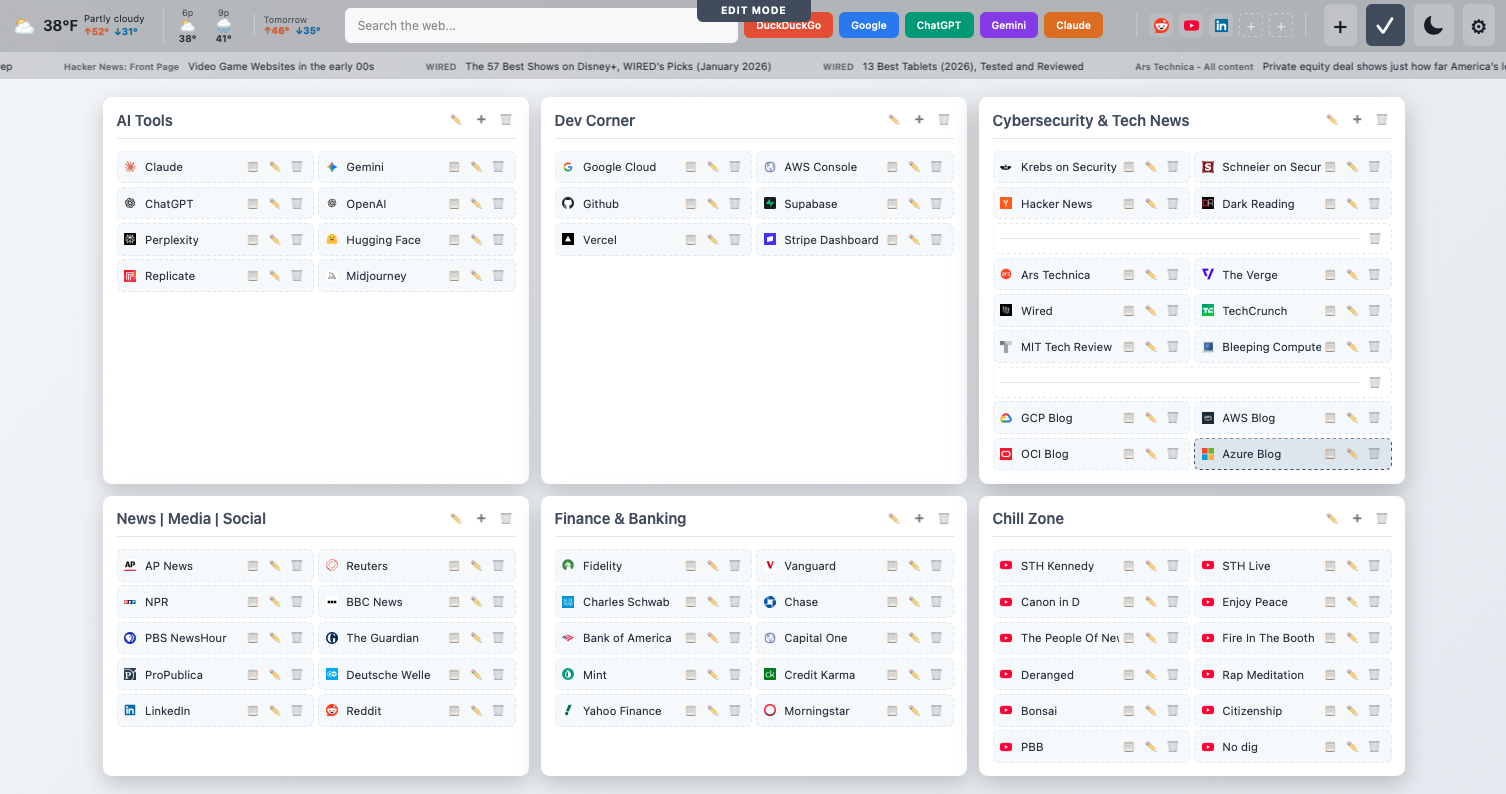
Collapsible categories with drag-and-drop reordering. Each category supports 1-3 column layouts based on content density. A quick-access bar at the top shows 5 favicon shortcuts for most-used sites.
Multi-Engine Search
One search box, multiple engines. Type and press Enter for default (DuckDuckGo), or use keyboard shortcuts:
g→ Googleb→ Bingp→ Perplexityc→ ChatGPTl→ Claude
Live Widgets
- Weather: Open-Meteo API (no key required)
- RSS: Scrolling headlines from configurable feeds
Themes
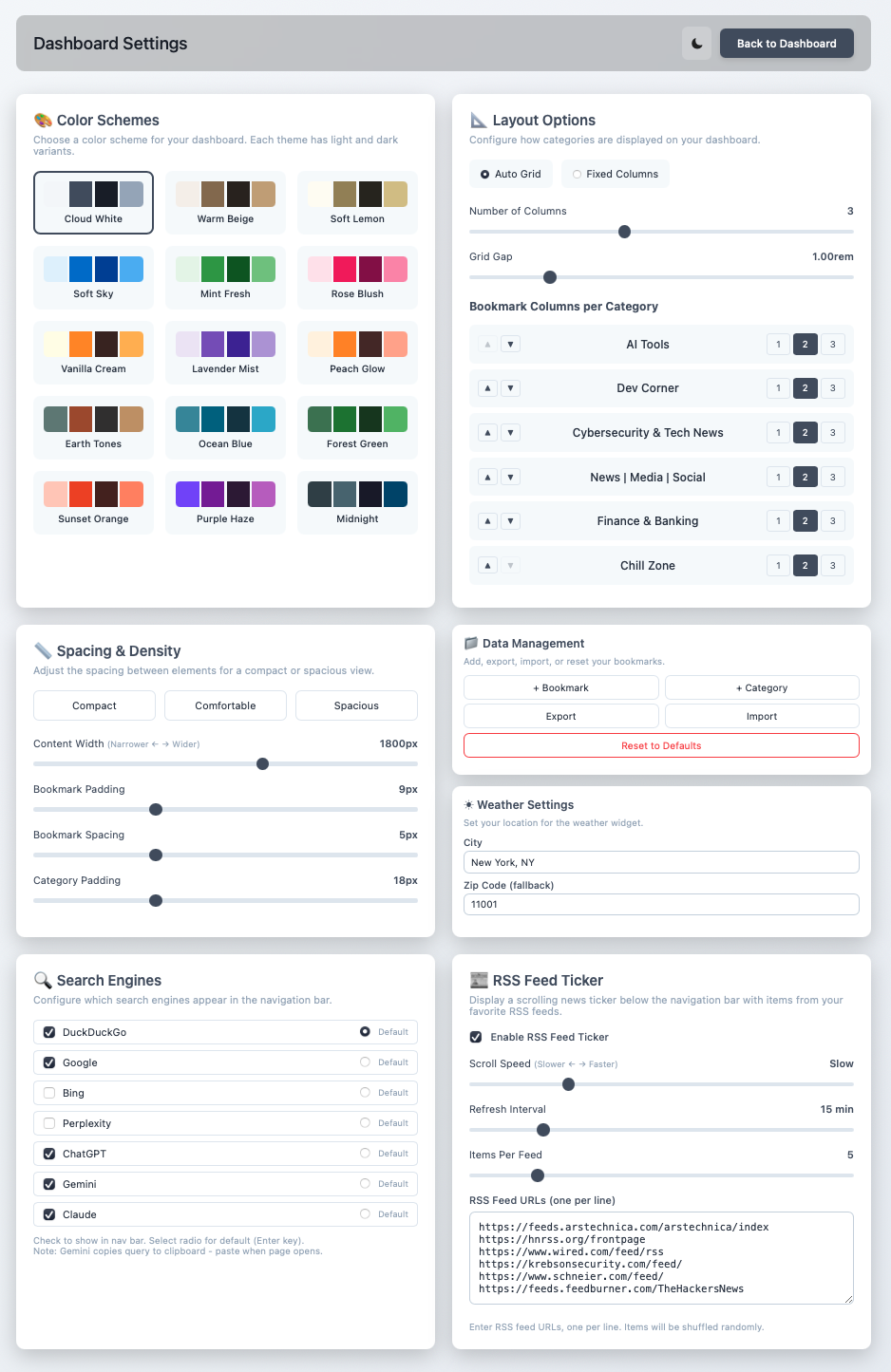
15 color schemes with light/dark variants:
- Cloud White, Warm Beige, Soft Sky
- Mint Fresh, Rose Blush, Lavender Mist
- Earth Tones (my default)
The Sync Problem
The hardest part: syncing across browsers and devices without a cloud account.
Solution: optional local server that saves to JSON files, with hooks for cloud storage providers.
Mode 1: Single Browser
Open dashboard.html as file:// URL. Data lives in localStorage. Zero setup.
Mode 2: Multi-Browser (Same Machine)
Run the included Node.js or Python server. Data saves to JSON files. All browsers on the machine share the same bookmarks.
Mode 3: Cross-Device Sync
Same local server, but configure it to sync JSON files to Dropbox/Google Drive/OneDrive/iCloud. Changes propagate across all devices.
Browser Compatibility
Getting browsers to use a custom new tab page is surprisingly difficult:
| Browser | Method |
|---|---|
| Safari | Native - just set homepage |
| Arc | Built-in custom new tab support |
| Chrome/Brave/Edge | Requires "Custom New Tab URL" extension |
| Firefox | Only works with local server (security restrictions on file://) |
The Result
My new tab page now shows:
- 6 bookmark categories with ~50 links
- Weather for my location
- RSS headlines from 5 tech feeds
- Search bar with AI assistant shortcuts
It loads in under 100ms, works offline, and looks exactly how I want. No accounts. No tracking. No monthly fees. The best part: adding a new bookmark in one browser immediately reflects in another.